 图译 Tuyi
Windows
Windows 10 or 11, 64-bit. Installer about 64 MB.
Download for Windows
The installer isn't signed yet, so Windows will stop it the first time. Click More info, then Run anyway.
Translate the Chinese on your DWG / DXF drawings into English
The translation goes back onto the drawing as a new file. The original stays as it is, and you don't need AutoCAD.
Free. For Windows 10 / 11 (64-bit) and Mac. Other versions
Using WorkBuddy, ChatGPT or Claude? They can run Tuyi for you, no clicking needed. Send it the sentence below and it will translate a whole folder of drawings.
Tuyi is installed on my computer. Please use it to translate the DWG / DXF drawings in my Drawings folder into English, save them as new files, and leave the originals alone.
The assistant has to be allowed to run programs on your computer. That usually means the desktop app, and it will ask you first.

The translation is written into a new file. Title blocks, notes, block attributes, dimensions and tables all get translated.
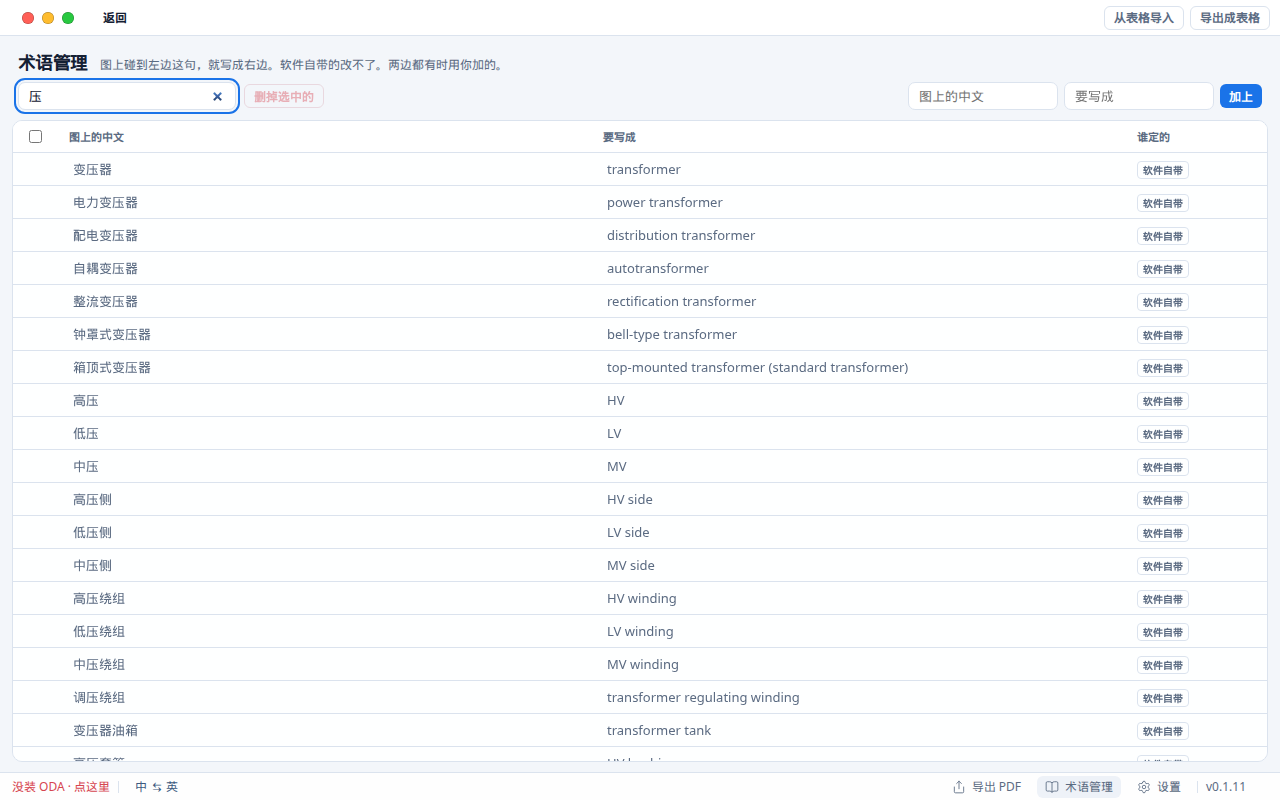
Common building, switchgear and transformer terms are built in and work offline. You can add your own.

Add several drawings, click 一起译 (translate together), and each one gets its own new file.
Free, no sign-up. Lines the glossary doesn't cover go to your own DeepL or Azure key.
v0.1.12, free
Windows 10 or 11, 64-bit. Installer about 64 MB.
The installer isn't signed yet, so Windows will stop it the first time. Click More info, then Run anyway.
Pick this for M1 to M4. Not sure? Check About This Mac in the Apple menu.
Open the DMG and drag Tuyi into Applications. The first time, right-click the icon and choose Open.
DXF works right after install. For DWG, also install the free ODA File Converter.